Orivon Browser
Here we explain the exact specification regarding how the Orivon Browser should look like, it may include developer side references
For each component we link where the deeper implementations details are available at, and how these components are integrated within the Orivon Browser
Initial basics
We don't want to reinvent the wheel
The current Web navigation stack is strong enough for Orivon needs, doing otherwise would be counterproductive for our goal
Orivon Browser will be based on various components of the classic Web Platform:
HTML/CSS/JS, WASM, DOM and various Browser API's
We add to it the capabilities that Web3 need to work properly, even tho we may modify the behavior of some components while keeping backward compatibility
From Technical Design: We plan to achieve this by starting from a Brave Browser hard fork, with chromium as upstream
Foundational UI Specification
Here is described the general basic UI components of Orivon
Like it is written on Initial basics, it will feature the same basic UI and UX features that a normal browser would
Tabs, URL Bar, Toolbar/Navigation buttons, Bookmarks, Settings panel, Status bars (ex. loading), Extensions UI and UX, Download indicator etc...
We add or modify to it various components to make it fit with Web3 needs
Dashboard
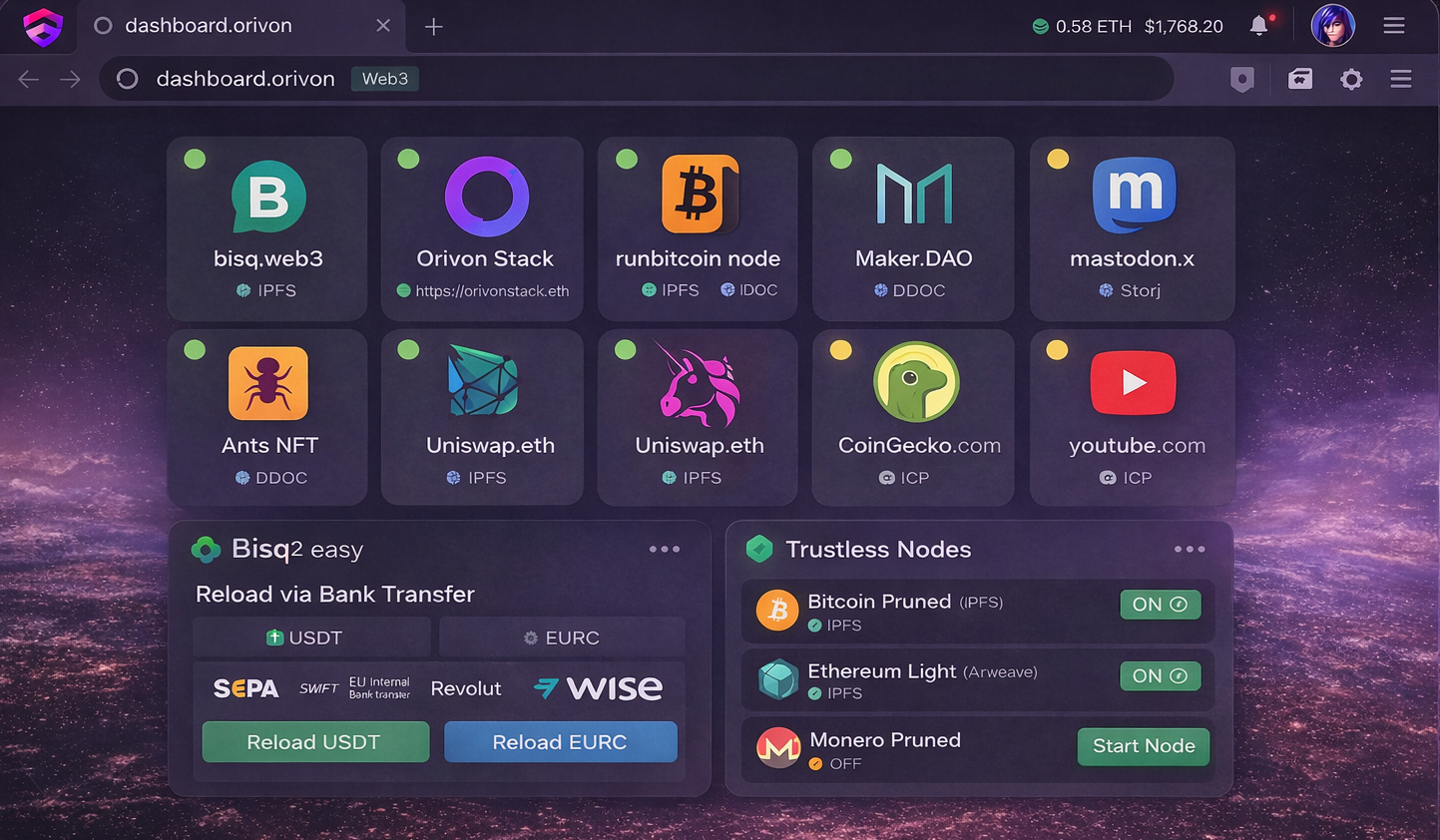 Take this only as an experimental and illustrative image
Orivon Browser will feature on the main new tab page the Orivon Dashboard App (changeable trough the Application System)
Orivon implements it's own Dashboard Application which is going to be the default one
The official Orivon Dashboard App will require grant and integration accesses who allows to access the list of Browser-wide installed Apps and interact with them in an effective way
The Orivon Dashboard is going to be Android inspired, with a resizable grid where Apps and Widgets can be placed into, some pre-inserted Apps may include Web3 App stores, featured Web3sites, Wallet management, Network, Nodes, Settings etc...
Web3 Scoring icons on the URL Bar will appear
Mouse scrolling will change dashboard page up to left and down to right
Further and exact specifications could be extended in future
Application system
Most kinds of Apps within Orivon Browser relies on the Modules system to work properly
Some instead may do based on the Technical Design decision
This section explains how Orivon Browser aims to use various App types independently if they are based on Modules System or not and how the Application system of Orivon works as a whole
Applications table
This table includes every interchangeable component of the Orivon Browser
| App type | Can run on-fly on Web3sites | Modules system | Description |
|---|---|---|---|
| Dashboard | ✖️ | Technical Design decision | Implements the newtab dashboard |
| DNS Resolution | ✅ | ✅ | DNS Resolver module |
| Data Gathering | ✅ | ✅ | Data Gathering module |
| Accounts | ✅ | ✅ | Key Management with relative cryptographic calculations logic support |
| Crypto | ✅ | ✅ | Specific cryptocurrency standard, cryptographic logic and network interaction |
| Address list | ✅ | ✅ | Gives to Orivon Browser Wallet a ready to use address list |
| Node Network | ✅ | ✅ | Implements support for a Network |
| Web3 Score Provider | ✅ | ✅ | Web3 score providing module |
Web3sites On-fly & Apps
Generally, every App relying on the Modules system can be run on a Web3site on-fly
That happens trough Modules injection, in fact modules can be always injected to be run into the Modules System
How precisely websites will inject modules into the Modules System is a Technical Design choice
Surely it will be some kind of extension functionality from the common Web Platform
Usually these modules are completely sandboxed and isolated.
We won't violate general Browsers security isolation philosophy.
The Permission System is used to grant controlled major access to other Modules / System resources or integrate Browser-wide (Browser-wide integrations are allowed only for installed Apps)
Example 1: A DNS Resolution module running on-fly on a site, can't resolve DNS Domains Browser-wide, but can trough module function calls within the website itself
Example 2: The ENS Domains resolver module, both if installed, or run on-fly, should be able to automatically use the same Ethereum network node that is installed within the user Browser
App installation
Web3sites can send to the browser the user prompt to install an Application or Module
For example to let it run browser-wide instead of on-fly
Whatever this same prompt access should require ad additional grant permission or not has room for discussion
With the prompt list of requested permissions will be shown
Orivon Browser will warn against risks for Apps with low Web3 Score Ignored Apps/Modules will be still available on the site information section
The appropriate danger alerts regarding the use of uncategorized or low level Web3 Score modules are shown as explained from the Integration Permissions Management specification
After installation a GUI for additional setup may be prompted
Newly installed Apps will be automatically added in the Dashboard
Javascript Apps
Even tho the Modules System doesn't have native support for Javascript, Orivon Browser will integrate the Browser-native engine to run effectively Javascript and allow it to interact with the Modules System
Meaning that Web3sites, Apps and Modules can be written completely in Javascript, without any WASM code
Javascript Apps are considered easier to make but less powerful, since they would be able to work only on the Orivon Browser or on some specific environment also supporting Javascript Modules/Apps alongside the Modules System
Furthermore, javascript usage from Web3sites should look pretty seamless with the access of the revolutionary capabilities that the Modules System brings to Orivon (such as access to deeper Network functions, Storage etc...)
How this is technically achieved is a Technical Design choice
Metadata
As the Modules system supports metadata, Orivon Browser will use these fields (or even additional folders) to store App Details such as App Name, Icon, GUI, Widgets etc...
Many of these needs of use-cases for metadata will surely appear at development phase
The way this is actually achieved will be a Technical Design choice
Permission System
The Orivon Browser Permission system has 2 goals
-
Grant Web3sites/Apps permissions to access other Modules / System resources
-
Integrate Browser-wide installed Applications functionalities
Grants table
To begin, Web3sites and Applications can be granted with this Permissions list:
| Permission | Description | Risk level |
|---|---|---|
| App List Access | Grant access to the list of installed Applications and Modules within the Browser and relative details | 10 |
| {Module} | Grant direct access to a specific Application or Module exposed functions | 8 |
| Storage | Grant unlimited storage space (module-sandboxed) | 2 |
| {Module Storage} | Grant direct access to the private storage of a specific Application | 10 |
| Shared Storage | Grant unlimited storage space on the shared storage (sandboxed) | 2 |
| Shared Storage access | Grant direct access to all Applications data saved within the shared storage | 4 |
| Shared Storage access (specific) | Grant direct access to a specific Application data saved within the shared storage | 3 |
| Advanced network | Grant access to controlled advanced network functions (like p2p, tcp etc..) | 2 |
| Raw network | Grant access to raw network functions | 10 |
| Port Opening | Grant access to open a specific safe and allowed port within the local network | 5 |
| Crypto Access | Allows to know the Crypto list implemented within the user Browser and access their relative functions | 1 |
| Account Wallet (specific) | Grant access to an user-chosen wallet Account trough its exposed functions | 8 |
| Address List (specific) | Grant read and transaction requests access for an user-chosen Address List | 3 |
| Network Nodes | Grant access to the Network Nodes system within the Orivon Browser | 2 |
| Network Node (specific) | Grant access to a specific Network Node type supported within the Browser | 3 |
| DNS Resolution | Grant access to the DNS Resolution system of Orivon Browser | 2 |
| DNS Resolution (specific) | Grant access to a specific DNS Resolution method supported within the Browser | 3 |
| Data Gather | Grant access to the Data Gathering system of Orivon Browser | 2 |
| Data Gather (specific) | Grant access to a specific Data Gathering method supported within the Browser | 3 |
| Web3 Score | Grant access to the Web3 Score system used within the Browser | 2 |
PRIVACY CONCERNS
This table may trigger some privacy concerns, for that reason we clarify the nature of Orivon
Web3sites are considered to be as the name says, Web3sites, meaning that something that collects your data is Web2, and won't be anywhere near to pass any Web3 Score checks, meaning that such permission will be hard to guarantee
Accessing to Web3sites is intended to be just a very simplified and user friendly way to something complex like finding an open source project on Github, seeing if it is reliable and installing it in your pc
An user would still give this permission to that project, Orivon just makes it simpler
Orivon removes this entire process and puts it within a URL
Simplifying the privacy risk awareness trough a trustworthy Web3 Score and an Android inspired Permission Management
There will be no way to fingerprint the user without his consent
SECURITY CONCERNS
Some security concerns may arise especially for the nature of the Advanced Network and Open Port components
This is handled with strong technical security policy and trustworthy audits, along with limitations and loud warnings for users towards Web3sites with low or unknown Web3 Score when permissions are asked
Anyway, our security policy doesn't want to rely at all on the Web3 Score, it's only a further limiting layer
Other addressed concerns:
-
Resources abuse concerns
Similar to nowadays browsers, who prevents CPU abuse with sandbox and only until the site is kept open, the same applies for permissions grants within Orivon Browser, once you close it, everything stops
Furthermore user awareness play a key role, since every resource access is limited behind a user-allowed permission
Notifications to detect suspicious increasing resources usage may be added to the UX
-
Storage abuse is prevented also with a dedicated section on settings showing storage usage from every Web3site
Integration table
Installed Application can receive additional permissions to integrate functionalities Browser-wide
While these same functionalities can be run independently on-fly within the sandbox of a Web3site without any permission, granting integration permissions on installed Apps powers them with Browser-wide capabilities extension and access
| Permission | Description |
|---|---|
| Application call | Allows the App to open or interact with any other Application installed at Orivon Browser - Requires App List Access grant |
| Crypto Integration | Allows the App to add support for a new crypto within the Orivon Browser |
| Account type Integration | Allows the App to implement a new Account type within the browser Wallet System |
| Address List addition (account-specific) | Allows the App to add a new Address List within the Orivon Browser - Requires Account Wallet (specific) grant |
| Network Node Integration | Allows the App to add a new Network implementation within the Orivon Browser |
| DNS Resolution Integration | Allows the App to add new DNS Resolution methods within the Orivon Browser |
| Data Gathering Integration | Allows the App to add new Data Gathering methods to the Orivon Browser |
| Web3 Score Providing | Allows the App to integrate into the Orivon Browser as a Web3 Score provider |
| Background execution | Allows the App to run as a daemon within the Browser |
| Socks5 Integration | Allows the App to integrate and make available for Orivon Browser a Socks5 Proxy - Requires Port Opening grant |
For each integration Apps can tell the browser if the Integration is active and working
As example, a Network Node App for Torrent Network may require additional setup by opening it before successfully working
Within the Dashboard an expandable icon will show alerts for Integrations which aren't successfully enabled
Management
We have seen two permissions tables so far
The Grants table and Integrations table, for each we explain the User Experience of them
By default, within the URL Tab options it will be accessible the panel to modify the permissions of the current Web3site/App
SETTINGS SECTION
Both for Web3sites and Apps, Orivon Browser features a settings section to manage permissions and see resources usage
It allows to revoke permissions and set cap limits on resource usage, whatever they are network type or storage
GRANTS PERMISSIONS MANAGEMENT
Resources grants are asked whenever the user opens a Web3site/App and its code decides to request for that permission
How is it precisely requested on the code it's up to the Technical Design decision
The user receives a Permission prompt with the list of required permissions
INTEGRATIONS PERMISSIONS MANAGEMENT
Integrations permissions grants are very simple:
They can be requested only during App/Module installation or update phase
Tha App/Module can choose what permissions are mandatory and whose are optional and always modifiable from settings
Even in that case, Permission prompt will be shown
PERMISSION PROMPT
Both grants and integration requests from Apps or Web3sites can call for the Permission prompt
Here we explain how it works once it gets open
For Web3sites the user can choose whatever to remember the decision, or revoke the permission once the site is closed
For Apps/Modules the decision is always permanent
In any case, permissions are revokable from Browser settings
Depending on the considered risk level of each permission it may be written in a different color, or with an alert icon along with double confirmation and reasons:
-
Low trust (0-3): permission name text is green along with an expandable informational icon
-
Medium trust (4-6): permission name text is yellow with a danger icon, expandable as an information panel
-
High trust (7-9): permission name text is red and when present it does always asks to the user double confirmation along with the entire informational message evidencing the trust of each permission
But a bypass does exist
In fact (as an opt-out option on settings) sites with a very high Web3 Score will appear the same as Medium trust
-
Severe trust (10): The same of High trust, but without the Web3 Score influence, and possibly a different warning icon
Apps and Web3sites can always ask new resources grants after installation
But in that case it will always ask for double confirmation from the user
Wallet System
As the Orivon Wallet System states, 3 types of Integrations exists and works together:
- Account Integration
- Crypto Integration
- Address List Integration
We already know how they work together, but how Orivon Browser actually works with them?
This section explains how the UX for the Wallet System within Orivon Browser is organized
Management
Orivon Browser features an apposite section within settings to interact with the Wallet System
Section accessible also trough a shortcut within the Dashboard
There you will be able to access Account management and they correlated Addresses management
Optionally also Crypto Integration configuration will be shown
Account Management
When you enter the management section of the Wallet System you will be shown the list of accounts currently created in your browser, along with a "+" icon to add a new one
By default a mnemonic wallet account will be already set up
When user clicks the "+" button he will be prompted with the list of Account types available
Available account types are the ones that Account Integrations adds
Once the user choose what Account type to create the GUI of the App will open to perform the Account creation task
The App will eventually return back to the Wallet System management with success or failure
In case of success the new account type will be created and stored within the Orivon Browser
After an account is created, you can click on it to manage its related Address List
Otherwise you can also open the App GUI for further special managements
Address management
We know from the Modules System that each Crypto Module indicates a preferred Address List Module
Usually at Orivon Browser, when a Crypto Module is installed, the preferred Address List Module should be installed as well
If this is not the case, when an account is created, no Address List will be automatically available for that Crypto
Note: The preferred Address List module will be probably stored on metadata, that has room for Technical Design choice
Within the Account management panel it is shown the list of Crypto this Account supports
At each crypto the user can add a new Address List, choosing between the available and compatible Address Lists Apps
The result is that other than the automatic default Address List, the user will be able to add more custom Addresses List for use
Furthermore, in that phase a GUI may optionally open if the Address List App requires additional configuration
As an example, a Vanity Address List generator requires to setup prefix and/or suffix
ADDRESS GROUPS
Additionally to the Address Lists, which stays under a specific Crypto, in the practice a problem may arise
A Web3site or App may ask access to an Address or Address List for multiple Crypto at the same time
In that case the basic solution relies on using the preferred Address List of each crypto App
And in case the site needs only a single address for each crypto, use an index number instead
But what if the user wants control on that?
The user can create Address groups.
An Address group could be made both by single addresses or by Address List
So that the user can have its own custom Address combination ready to be chosen once a site asks for that
Crypto management
Each Crypto module may need an additional GUI configuration page
In that case, a settings icon will appear on Account settings along each Crypto to allow further changes
The App will be aware that its GUI has been open from hat specific Account settings
Just in case it needs Account specific modifications
Furthermore, for each Crypto standard code, only one Crypto App can be chosen to handle it
That leaves room for discussion regarding whatever it's the best choice or not
Interaction
The Wallet System comes in action the moment an App/Web3site is opened
If the user provides the permission "Crypto Access" to a site, it will know all the Crypto's the user browser supports
Then the Web3site/App can ask to access an Address or Address List, both for one or more Crypto
In this case the user will be able choose an index for single Addresses, or the Address Lists
If there are, Address groups can be chosen as well
Now, when the App/Site needs to interact with a specific address (as example, for a transaction), any needed GUI could be opened from every App the Wallet System relies on
In this sequence:
Address List -> Crypto -> Network Node -> Account
Usually, when everything goes well, the Account one will be the only showing up
Which as example could be to confirm the transaction, or scan the QR Code with an air gapped hardware wallet
Web3sites implementing crypto by their own
In case user misses support for a Crypto, the Web3site could implement that by itself while still using the user Account
This is possible thanks to the permission Account access (specific), with a trust level of 8/10
(Yes, that's the same permission Address List Apps gets to work in the first place)
That has some powerful benefits, like having a non-custodial Bisq Tokens wallet just by opening bisqwallet.eth
The worst case scenario for this concession in case of bad actor is, privacy
A bad actor may be able to derive the entire Address Lists of the user, for every crypto his Account supports
For more about that check grants privacy concerns
Connection System
This section explains:
-
How DNS, Data Gathering and Network Nodes modules are used at Orivon Browser
-
How other connection-related features, like Port Opening, Proxies etc.. works
Websites loading
Ideally, every connection out of a Web3site passes trough the Modules System, specifically, Network nodes
At Orivon Browser, websites loading is a combination of DNS, Data Gathering and Network Nodes methods
DNS is the method to identify the ways to Gather the data (trough DNS Records)
Data Gathering is the way to Gather the data once the DNS has instructed it
Even if you've never seen that before, common browsers always had different DNS and Data Gathering methods
But since Web2 required only a limited set of these, it's never been modularized as Orivon does
So we begin to cite what Web2 native DNS and Data Gathering methods does commonly exists
Web2 DNS Modules:
- ICANN Domains
- IP Address
Web2 Data Gathering Modules:
- HTTP / HTTPS
If we had to classify also some sort of "Web2 Network Nodes":
- WebSockets
- Server-Sent Events
- WebRTC
The Only difference between Web2 Network Nodes, and Web3 Network Nodes, are their nature, since Web2 Network Nodes relies on centralized connections, Web3 Network Nodes are decentralized (like Ethereum, Torrent, IPFS)
If web2 systems should be moved and used merely trough the Modules System even for Web2sites is a Technical Design choice
What's sure is that Orivon Browser should allow to mix Web3 Modules like DNS and Data Gathering with the old Web2 methods
Meaning that Orivon Browser can use ICANN Domains pointing to an IPFS Data Gathering
Or ENS Web3 Domains, pointing to an IP Addresses (HTTP / HTTPS Data Gathering)
For the rest of Web3sites instead, Orivon Browser will rely merely on the Modules System
As example, ENS Domains with IPFS Data Gathering
Native DDOC
Orivon will implement for sites using HTTP or HTTPS the Native DDOC Support
How this is precisely achieved it is a Technical Decision choice
Modules Priority
DNS, Data Gathering and Network Nodes each have a standardized identifier to declare what they support
For example DNS with .eth, .web3, .btc
Data Gathering with IPFS, Arweave
Network Nodes with BTC, ETH, TORRENT etc...
What if multiple Apps, supports the same identifiers?
It is solved trough the Priority-able Modules group which allows to set a priority level for each Module
That's the way the Modules System handles modules with that potential problem
From settings, or when conflicts appear, the user will be able to choose the priority level of each Application
Whatever it is DNS, Data Gathering or Network Node
Then, when a DNS, or Data Gathering request, or Network Node request is made, in case of failure, the request will fallback to the first App in priority after the failed one
The amount of maximum fallbacks is set to 1, but it can be modified from the user on settings
Port Opening
It is a Technical Design choice to decide which ports Modules can open at Orivon Browser
Orivon Implementation does not require any specific set of ports
Proxy System
When an App opens a port within the Browser, it can register on that as a Socks5 proxy
Registering into the Browser is just a way to integrate the proxy within the Orivon Browser without manual IP setups
In fact on settings there will be 2 layers of proxy selection:
-
Browser-wide proxy: sets up a proxy for the entire Browser and relative Apps
-
App-specific proxy: sets up the proxy for the specific application
It features 3 options, which are
Browser to sync with the Browser-wide options
System to forcefully select no proxy
Proxy select a specific proxy overriding the Browser-wide settings
Proxy chaining joining multiple Proxy Apps is allowed
Web3 Scores
Web3 Scores are a key point to make Orivon Browser suitable for mass adoption practically spreading the true Web3 principles across
Here's a list of where Web3 Scores appears:
-
When a Web3site is open: It shows up as a colored icon on a side of the URL Bar referring how Trustless the access to that site is
Icon color changes based on the Trustlessity level of that site
The Icon will be purple if in addition to high Trustlessity it is classified as privacy preserving
-
When Grants/Integration permissions are asked: It highlights to the user the risks involved on giving certain permissions, especially for low Trustlessity score Apps/Sites
Look at permission prompt
-
Operation request: When any Account operation is called, the Operation Request panel will be shown
This panel will show the entire Web3 Score with the Trustlessity and Security of that operation as 2 separate indicators
In case the operation is considerable reasonably Privacy preserving, an additional Privacy indicator will be shown
-
App installation phase: In this case, the Web3 Score will be a general assessment for the entire Application Trustlessity
When the App will ask for anu permission, the permission prompt will be still shown
Providers management
By default Orivon Browser will use the most trusted and powerful Web3 Score provider out there
But being just a module integration, more than a Web3 Score provider can be used within the Orivon Browser at the same time
Or even remove the default one if the user really wants to
That way, a provider which may not have classified some sites, can be compensated from another provider who instead did
When more providers have an available score for the same resource, the one higher in priority will be used
Provider priority is changeable on settings
Furthermore, when details for Web3 Scores are shown around the browser, a "second page" button will be available to see the different Web3 score evaluations between the various available providers
Search
The perfect search engine for Orivon Browser will have the following features:
-
Prioritizing Web3sites within the results (even tho being not 100% exclusive to them)
-
Having a good Web3 Score by itself
-
Use the client-side Web3 Scores as metric to prioritize results
It could be implemented by querying the browser itself, or knowing what modules are installed with their relative priority to use these accordingly
For that reason Web3 Search engines will be probably using the 'Web3 Score' grant permission to accomplish their needs
Work in progress
There are some components which are still work in progress and will be added soon to this Implementation specifications
- Appstore